

Asana and Trello are two names you hear when you search for a suitable project management tool. They both are SaaS platforms and provide different subscription plans. But which one is better?
If you are stuck at this point, let us help you. This blog focuses on differentiating Asana vs Trello. Discover what sets them apart, their pros and cons, pricing structure and ease of use in this in-depth comparison guide.
30-Second Summary
Asana and Trello are two widely used platforms for project management. Both have sets of features that make your work easy. But they differ in many aspects as well.
In this blog, you will explore Asana vs Trello and what aspects make them different from each other. With this information, you can pick the tool that best suits your needs.
Asana and Trello at a Glance
Both of these platforms are used in project management. However, the audience they cater to is different.
Asana is ideal for small to large teams. Those who want to use templates in their projects and use AI-powered tools for smooth execution should use Asana.
Trello is great for individuals (such as freelancers) and small teams. Those who want to manage tasks on a budget and use Kanban boards should use Trello.
Asana vs Trello: A Tabular Comparison
| Feature | Asana | Trello |
| Integrations | 300+ integrations | 200+ integration power-ups |
| Interface style | Structured, offers boards, lists, timelines, etc | Focuses on visual Kanban boards |
| Ease of Use | Not too hard | Beginner-friendly |
| Automation | Built-in workflows | Uses the Butler automation tool |
| Task Management | Advanced with dependencies | Simple and visual |
| Collaboration | Excellent for teams | Flexible and lightweight |
| Scalability | Perfect for scaling | Needs add-ons for scaling |
| Best For | Complex projects and larger teams | Visual planning and small teams |
Asana vs Trello: Project and Task Management Tools
While both platforms offer similar task management features, there are also certain differences.
Trello
Trello offers exceptional Kanban boards. The ease of use and customization options make them an ideal tool for project management teams. However, its calendar, Gantt charts and table views are not well-built.
These tools make Trello better for simple projects. Butler is a built-in automation tool that supports task information, such as labels, dates, attachments, members and checklists.
Asana
Asana offers tools that handle complex projects. The drag-and-drop feature makes using this tool easy for everyone. You can add due dates, custom fields, dependencies and due dates effortlessly on Asana.
If you want to manage diverse tasks, stick to this platform. It is an ideal platform for predictive (traditional) project management and agile frameworks, such as Scrum and Kanban.
Asana vs Trello Automation
Both platforms have automation builders.

Trello
If you want a budget-friendly option, Trello software is ideal. You can use Butler and develop automation. The best part is that this feature is available on the free plan as well.
However, you get only 250 actions per month on the free plan. Using this tool, you can create rules, buttons, due dates and scheduled automation.
Asana
Asana’s automation builder is easier to use. However, you can only access it on the Starter package and upwards. There is no limit, which means that you can automate as many workflows as you need.
It also provides the Workflow Builder. It handles repetitive tasks by mapping, designing and visualizing them.
Asana vs Trello: Integrations
Asana and Trello both offer integrations with your existing software. However, the difference lies in the scope and management.
Trello
All integrations in Trello are available on the free plan as well. It also offers Power Ups. These are similar to integrations.
But unlike them, Power Ups add features to your boards, like calendar views and custom fields. You can integrate these features with Google, Slack, Dropbox and Zapier.
Asana
On the other hand, Asana allows its users to connect to a larger number of apps. It does offer integrations on free plans. Some integrations, such as Salesforce and Tableau are available only on the Enterprise plan.
It allows data sharing and workflow automation across different platforms, including Google Sheets, HubSpot, Slack and Google Calendar.
Which is better for developers and marketers?
Asana can integrate with multiple apps, creating a strong ecosystem. It is well-suited for software development workflows.
On the contrary, Trello’s focus on visuals makes it ideal for managing campaigns and handling creative workflows. It is ideal for marketers.
Asana vs Trello Reporting and Analytics
Let’s have a look at how Asana and Trello handle reporting and analytics.
Trello
Trello offers simple dashboards for reporting and analytics. It has a limited set of metrics, including cards per list, cards per member, cards per label and cards per due date. However, it limits reporting to pie charts, bar graphs and line graphs.
If you want detailed reporting, you might need to integrate Trello with third-party tools. You can use the basic reporting feature on the free plan. However, an upgrade is necessary to use advanced reporting features.
Asana
Asana offers comprehensive dashboards. They show various project metrics, including financial data, workloads, due dates, task status and upcoming tasks. With KPIs, you can track the progress of your project.
The dashboards are easy to navigate and visually appealing. Asana’s reporting and analytics features are available on the free plan. For advanced features, you need to upgrade your subscription package.
Asana vs Trello: Performance and Speed Under Load
While they both are capable of working under load, the outcome can be different due to design.

Trello
Trello has a simple interface. The drag-and-drop feature is responsive while handling a heavy volume of action. It is fast and efficient due to being lightweight. The Kanban interface is intuitive, resulting in smooth performance.
However, when working with numerous users and projects, it can lag. You need Power Ups if you want to manage complex projects with intricate dependencies.
Asana
Asana is designed to handle enterprise operations. That means it can handle large volumes of projects and users efficiently. It has features such as portfolios, workload and goals. These are used to organize numerous tasks without lag.
It offers a sophisticated interface for project tracking and planning. However, it can slow down or dip in performance when there are complexly structured tasks on dashboards.
Asana vs Trello Security and Data Protection
Both platforms provide security and data protection. Let’s see where they differ.
Trello
Trello offers basic security features, including two-factor authentication and user permission controls. It also provides SSL and TLS encryption for data. Trello encrypts data when it is in transit and at rest.
However, it lacks HIPAA compliance. If you work in healthcare, you should skip using Trello altogether.
Asana
Asana has advanced security features. It provides two-factor authentication and single sign-on (SSO). It also offers SAML 2.0. You can control data on the mobile app as well. Data is encrypted at rest and in transit.
Asana is HIPAA compliant. You can use it to protect any sensitive information in the healthcare industry. It offers greater control over user access and permissions. Additionally, the dashboards show user activity for enhanced security.
Asana vs Trello: Scalability and Enterprise Readiness
Which is more scalable and enterprise-ready? Below is a breakdown.
Trello
Trello is less scalable than Asana. It might not support larger teams and complex projects. It can lag with numerous boards and tasks. It is also not suitable for enterprise-level operations.
It lacks some advanced features and security compliances that are essential in enterprises. However, it is excellent for small teams and individual projects.
Asana
Asana is scalable as the company expands. It is built to handle large teams and projects. The features, such as custom workflows, dependencies and reporting make it ideal for larger businesses.
For enterprises, this platform is great. It offers integrations, security features and other various tools that make it a suitable fit for an enterprise environment.
Asana vs Trello Pricing Comparison
Have a look at how much you have to pay to access both Asana and Trello.
Trello
This platform offers tiers for upgradation. In Trello’s free plan, 10 people per workspace can use it. The free plan includes:
- 10 boards per workspace
- Unlimited cards
- 2-factor authentication
- Unlimited activity log
The standard subscription starts at $6 per user per month. The premium package is $12.50 per user per month.
| Plan | Monthly Subscription | Yearly Subscription |
| Free | Free | Free |
| Standard | $6 per user per month | $5 per user per month |
| Premium | $12.50 per user per month | $10 per user per month |
| Enterprise | Depends on the number of users | Depends on the number of users |
Asana
Asana offers 1 free and four paid plans. In the free plan, 10 users can enjoy:
- Unlimited activity log
- Multi-factor identification
- List, board and calendar views
- Unlimited tasks and projects
However, Asana is pricier than Trello. The cheapest plan starts at $13.49 per user per month. The premium plan costs $30.49 per month.
| Plan | Monthly Subscription | Yearly Subscription |
| Free | Free | Free |
| Starter | $13.49 per user per month | $10.99 per user oer month |
| Advanced | $30.49 per user per month | $24.99 per user per month |
| Enterprise | POA | POA |
| Enterprise+ | POA | POA |
Other Differences between Asana and Trello
Below are some other aspects that differentiate these platforms.

Asana vs Trello Ease Of Use Vs Complexity
Trello: The Kanban interface offers simplicity. Even beginners can easily learn and navigate it. For example, a small marketing team can use its content calendars easily.
Asana: It offers extensive features that support large teams and intricate projects. However, with so many features, it can become a little tricky to navigate.
Asana vs Trello Timeline Vs Calendar
Trello: This platform offers a timeline view through Power-Ups. The calendar view shows tasks and their deadlines. However, these are not as feature-rich as Asana.
Asana: The timeline view is powerful. The clear interface allows you to track project dependencies and timelines. The calendar helps in scheduling multiple tasks and events.
Asana vs Trello UI Difference
Trello: The Kanban style offers a simple UI experience. The boards are visual and intuitive. It is easy to understand the tasks and their statuses to track the overall project.
Asana: This platform provides multiple ways to see projects, including lists, boards, timelines and calendars. You can customize dashboards according to your needs.
Asana vs Trello For Remote Teams
Trello: This platform is ideal for remote teams, particularly if they are small and handle simple projects. The features are not as advanced as Asana’s, making it unsuitable for larger projects.
Asana: It offers a wide range of features that streamline every task. However, it may take some time to learn it, which is difficult in remote settings.
Pros and Cons of Asana and Trello
This section outlines the pros and cons of both platforms.
Trello
Pros:
- Live chat support on all paid plans
- More affordable than many other platforms
- Automation, even on the free plan
- Kanban-focused approach
Cons:
- Basic functions (not updated regularly)
- Fewer collaboration tools
- Simple project templates
Asana
Pros:
- Unlimited storage
- User-friendly dashboards and chart builder
- Clean and easy-to-use interface
- Excellent third-party integrations
Cons:
- Some features are accessible only in the Advanced plan.
- Very expensive for larger teams
- Lack of phone-based support
Can You Use Both Trello and Asana?
While they both differ in many aspects, you can use them together for enhanced functionality.
Trello can help with visual planning, brainstorming and content calendars. While Asana can handle structured workflows, their execution and tracking.
How can you Connect Both Platforms?
You can either use integration tools or manually connect them.
Integration:
- Unito can sync tasks, comments and due dates between Trello and Asana.
- Make is perfect for advanced data routing and automation between Asana and Trello.
- Zapier can automate tasks on commands, for instance: “create a Trello card when an Asana task is added.”
Manual Connection:
- Add Trello card links to Asana tasks and vice versa.
- You can use shared dashboards or folders across both platforms.
Best Use Cases for Asana and Trello
Let’s have a look at where these platforms work the best.
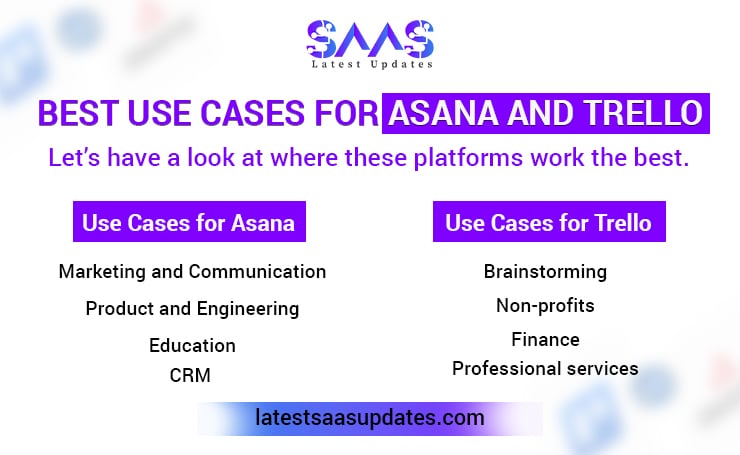
Use Cases for Asana
Marketing and Communication: You can streamline campaign planning, track performance and create content.
Product and Engineering: It is ideal to coordinate product development, manage sprints and track engineering tasks.
Education: It helps in coordinating educational events, curriculum development and handling student projects.
CRM: You can customize CRM to help sales teams manage accounts and leads efficiently.
Use Cases for Trello
Brainstorming: You can create visually appealing boards where you keep your ideas visible and actionable.
Non-profits: It helps in managing fundraising campaigns, coordinating volunteer activities and tracking the progress of the program.
Finance: It is ideal to streamline all finance-related operations for transparency and meeting deadlines.
Professional services: It offers automation and advanced views. You can manage and prioritize multiple clients with ease.
Wrapping Up
Asana and Trello are popular project management platforms. Both are cloud-based but differ in numerous aspects. Each platform has its strengths and weaknesses.
For smaller teams and easy tasks, users prefer Trello. When it comes to expanded teams and intricate projects, Asana is preferred. This blog explored various aspects of both platforms that make them distinct from each other.
You can choose either one or both, depending on your needs. For more SaaS-related information, explore the Latest SaaS Updates.
FAQs
Is Trello easier to use than Asana?
Yes, Trello offers an easy-to-use interface. The functions can be learned quickly. Asana has a slightly complex interface, which is ideal for multi-layered projects.
Do Asana and Trello offer Free Plans?
Yes, both platforms offer free plans. Trello provides a flexible platform for casual use in the free plan. On the other hand, Asana has advanced features but allows limited users.
Which is better for Enterprises: Asana or Trello?
Asana is generally considered better for enterprises. Its features, including portfolios, goals and advanced reporting are all that a larger enterprise needs. Trello can work, but you may need Power-Ups for better performance.
Which Platform, amongst Trello and Asana, has better integrations?
Both platforms offer 200+ integrations. Asana has built-in features for cross-functional work. However, Trello needs Power-Ups to offer the same functions.
